


Small businesses that provide on-site services need a reliable way to schedule jobs, dispatch technicians, track work orders, manage customer details, create invoices, and monitor team performance. Field service management software for small business helps owners replace scattered spreadsheets, paper forms, phone calls, and manual calendars with one connected system. The right platform can reduce missed appointments, improve response times, simplify billing, and give managers clearer control over daily field operations.
For small HVAC companies, plumbing businesses, electrical contractors, cleaning services, landscaping teams, appliance repair firms, pest control providers, and maintenance companies, field service work depends on coordination. A customer requests service, an office worker books the job, a technician travels to the site, parts may be used, photos or notes may be collected, and an invoice must be sent. When each step is handled manually, errors become expensive. A good system keeps the full service cycle organized from the first request to the final payment.
Identify Your Service Workflow Before Choosing Software
Start by mapping how your business currently handles customer requests, job scheduling, technician dispatch, field work, invoicing, and follow-up. This step helps you choose software that matches the way your team actually works instead of buying a system with features you may never use. A small business should look at the full journey from first contact to completed payment because every weak point in that journey creates delays, confusion, or lost revenue.
Your workflow should include the channels customers use to request service, such as phone calls, website forms, email, text messages, or repeat maintenance plans. It should also include how office staff create jobs, assign technicians, confirm appointments, update schedules, and send job details to the field. If your company handles emergency calls, recurring visits, warranty work, estimates, or multi-day projects, those details should be documented before comparing software.
This preparation gives you a clearer buying standard. A two-person appliance repair business may need simple scheduling, mobile job notes, and invoice creation. A growing HVAC company may need route planning, inventory tracking, maintenance agreements, customer history, estimates, and payment processing. By understanding your service flow first, you can avoid paying for unnecessary complexity while still choosing a system that supports future growth.
List the Core Features Your Team Needs Daily
Focus first on the features your staff and technicians will use every day. Field service management software for small business should usually include job scheduling, dispatch management, customer profiles, mobile access, work order tracking, estimates, invoicing, payment collection, reporting, and communication tools. These features support the daily actions that keep service businesses moving.
Scheduling and dispatch tools help office staff assign the right technician to the right job at the right time. A calendar view shows open time slots, booked appointments, technician availability, and urgent service requests. Mobile work orders give technicians access to customer information, job descriptions, service history, checklists, photos, notes, and required parts. Invoicing tools allow the business to generate bills quickly after the job is complete, which improves cash flow.
A small business should also consider tools that reduce repeated admin work. Automated appointment reminders can reduce no-shows. Digital forms can replace paper checklists. Customer records can store addresses, equipment details, service history, estimates, invoices, and communication notes. Reporting dashboards can show revenue, completed jobs, technician productivity, unpaid invoices, and job status. These practical tools help the business run with fewer manual steps and fewer mistakes.
| Business Need | Useful Software Feature | Practical Value |
| Book jobs faster | Drag-and-drop scheduling | Reduces calendar conflicts and manual updates |
| Assign technicians clearly | Dispatch board | Sends job details to the right worker |
| Track field work | Mobile work orders | Keeps notes, photos, and completion status organized |
| Bill customers quickly | Invoicing and payments | Speeds up cash collection |
| Manage repeat customers | Customer profiles | Stores history, preferences, and service records |
| Monitor performance | Reports and dashboards | Shows revenue, job volume, and team output |
Compare Scheduling and Dispatch Capabilities
Choose software with scheduling tools that match the pace and complexity of your service calls. A strong scheduling system should allow office staff to create jobs, view technician availability, update appointments, handle urgent requests, and reduce double bookings. For a small business, scheduling quality often determines whether the workday feels controlled or chaotic.
Dispatch management should make communication between office staff and technicians simple. The system should send job details directly to a technician’s mobile device, including the customer name, address, appointment time, service description, notes, and required tasks. Some systems also include GPS tracking, route planning, technician status updates, and map views. These tools help the office understand who is available, who is delayed, and who can take the next job.
The best choice depends on your service model. A cleaning company with recurring appointments may need route grouping and repeat scheduling. A plumbing company may need emergency dispatch and real-time job reassignment. An HVAC company may need seasonal scheduling, maintenance agreement visits, and technician skill matching. When comparing options, look for scheduling tools that reduce daily friction rather than adding extra clicks.
Check Mobile App Quality for Field Technicians
Evaluate the mobile app carefully because technicians will rely on it during service calls. A useful mobile app should let field workers view assigned jobs, update status, add notes, upload photos, complete checklists, collect signatures, create estimates, record parts used, and send invoices or payment links. If the mobile experience is confusing, technicians may avoid using the system, which limits its value.
Mobile access should work well on the devices your team already uses. Some businesses provide company phones or tablets, while others allow technicians to use their own devices. The app should be easy to navigate, fast to load, and reliable in areas with weak signal. Offline access can be valuable for businesses that work in basements, rural areas, commercial buildings, or locations with poor connectivity.
Technician adoption matters as much as software capability. A small business should choose a system that feels practical in the field, not just impressive in a sales demo. The mobile app should reduce paperwork, shorten job closeout time, and give technicians enough customer and job information to work confidently. When technicians can finish documentation at the job site, the office receives cleaner information and invoices can be created sooner.
Organize Customer Records and Service History
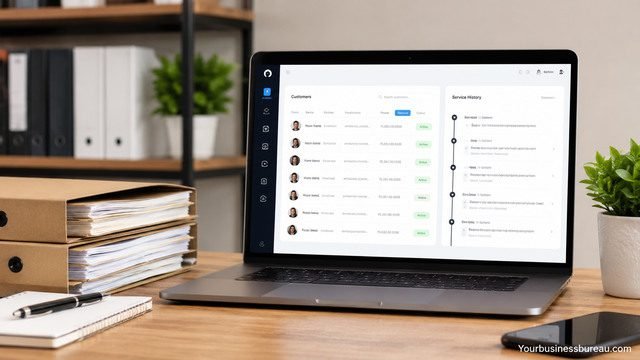
Use software that centralizes customer information in one searchable location. Customer records should include names, phone numbers, email addresses, service addresses, billing details, appointment history, notes, equipment information, estimates, invoices, payments, warranties, and communication records. This gives office staff and technicians a complete view of the customer relationship.
Service history is especially important for businesses that maintain equipment or perform repeat work. HVAC companies need model numbers, filter sizes, warranty information, and past repair notes. Pest control companies need treatment history, property notes, and recurring service details. Landscaping companies need property preferences, seasonal services, gate codes, and photos. Appliance repair companies need serial numbers, parts history, and prior diagnosis notes.
Better customer records improve service quality. When a technician knows what happened during the last visit, the customer does not have to repeat the same information. When office staff can see unpaid invoices or open estimates, follow-up becomes easier. When a customer calls with a question, the business can respond quickly because the information is stored in one place.
Set Up Work Orders, Forms, and Checklists
Create clear work order templates that guide technicians through each job type. A work order should include customer information, job location, appointment time, service request, assigned technician, task details, materials, labor, notes, photos, signatures, and completion status. The goal is to make every job easier to complete and easier to document.
Digital forms and checklists help standardize service quality. An electrical contractor may use safety checklists. A cleaning company may use room-by-room task lists. A pool service business may record chemical readings. An HVAC company may document equipment inspection points. These forms reduce missed steps and create a reliable record of work performed.
Good documentation also protects the business. Photos can show before-and-after conditions. Customer signatures can confirm job approval or completion. Time stamps can verify arrival and departure. Detailed notes can support warranty decisions, dispute resolution, and future service calls. For small businesses, this level of recordkeeping can improve professionalism without adding heavy administrative burden.
Connect Estimates, Invoices, and Payment Collection
Select software that connects estimates, work orders, invoices, and payments in a smooth process. A customer may request a quote, approve the estimate, receive the service, get an invoice, and pay by card or online link. When these steps happen in separate tools, information gets copied manually, which increases the chance of errors.
Estimate tools should allow your business to list labor, parts, materials, taxes, discounts, and optional services. Once approved, the estimate should convert into a work order or invoice without retyping all details. Invoicing tools should support clear line items, customer information, payment terms, due dates, and automatic reminders. Payment processing should allow faster collection through credit cards, ACH, mobile payments, or online payment links.
Cash flow is a major concern for small service businesses. Delayed invoicing can delay payment by days or weeks. When technicians can complete job notes and trigger an invoice from the field, customers receive bills faster. When customers can pay immediately, the business reduces unpaid balances and spends less time chasing overdue accounts.
| Financial Task | Manual Method Problem | Software Improvement |
| Create estimates | Repeated typing and inconsistent pricing | Uses saved items, templates, and price lists |
| Convert approved work | Estimate details may be lost | Turns estimates into jobs or invoices |
| Send invoices | Delays after job completion | Sends invoices immediately |
| Collect payment | Checks and cash slow down deposits | Supports card, ACH, or online payments |
| Follow up overdue bills | Manual reminders take staff time | Sends automated payment reminders |
Review Inventory, Parts, and Equipment Tracking
Add inventory tracking if your business depends on parts, materials, tools, or equipment. Many small field service companies lose money when technicians do not know what is in stock, parts are not recorded on work orders, or materials are forgotten during invoicing. Software can help track common items, usage, cost, and availability.
Inventory features may include part lists, stock counts, warehouse locations, truck inventory, reorder alerts, purchase orders, and cost tracking. A plumbing business may track valves, fittings, cartridges, and pipes. An HVAC business may track filters, capacitors, thermostats, refrigerant, and motors. A maintenance company may track light bulbs, hardware, cleaning supplies, and replacement parts.
Equipment tracking can also support customer service. If your company services equipment at customer sites, the software should store equipment records under each customer profile. This may include installation date, brand, model number, serial number, warranty status, maintenance plan, repair history, and recommended replacement date. These details help technicians diagnose problems faster and help the business identify future sales or maintenance opportunities.
Evaluate Reporting and Performance Dashboards
Choose reporting tools that show the health of your business in simple, useful numbers. A small business owner should be able to see completed jobs, open jobs, revenue, unpaid invoices, average job value, technician productivity, quote approval rates, cancellation rates, and customer trends. Reports turn daily activity into decisions.
Performance dashboards should be easy to understand. A good dashboard can show how many jobs were completed this week, which technicians are handling the most work, which services produce the most revenue, and which invoices remain unpaid. For growing businesses, reporting can also reveal bottlenecks, such as too many unassigned jobs, delayed invoices, or low estimate approval rates.
Reports should support action, not just display numbers. If one service category is highly profitable, the business may promote it more. If one technician has longer completion times, the manager may provide training or adjust assignments. If unpaid invoices are increasing, the business may change payment terms. Clear reporting helps small businesses make better decisions without relying only on instinct.
Confirm Integrations With Accounting and Business Tools

Check whether the field service management software connects with the tools you already use. Small businesses often rely on accounting software, payment processors, email platforms, calendar tools, phone systems, website forms, and customer communication tools. Integrations reduce duplicate entry and keep information consistent.
Accounting integration is one of the most important areas. Many service businesses use accounting platforms to manage income, expenses, taxes, payroll, and financial reporting. When invoices and payments flow from the service software into accounting software, bookkeeping becomes cleaner. Without integration, staff may need to copy customer names, invoice amounts, tax details, and payment records by hand.
Other integrations can also improve daily operations. Website form connections can create new leads automatically. Calendar sync can help owners see appointments outside the service platform. Email and text message tools can send appointment reminders and follow-ups. Payment processor connections can support faster collections. The right integrations help your software become the center of daily work rather than another disconnected app.
Calculate Pricing Against Real Business Value
Compare pricing based on total value, not just the monthly subscription. Field service management software for small business may be priced per user, per technician, per office seat, per feature package, or by job volume. Some platforms charge extra for payment processing, advanced reporting, customer portals, inventory, GPS tracking, or premium support.
A small company should calculate the true monthly and annual cost before signing up. Include subscription fees, setup charges, training costs, add-on modules, payment processing fees, and any cost for extra users. Then compare that cost with expected savings. If the software helps reduce missed appointments, speed up invoicing, increase technician capacity, and improve customer retention, the value may be much higher than the subscription fee.
The lowest-priced tool is not always the best choice. A cheaper system that lacks mobile usability, invoicing, or scheduling flexibility can slow the business down. At the same time, a large enterprise platform may be more complex than a small team needs. The best pricing fit gives your business the essential tools, enough room to grow, and a clear return through saved time, better organization, and faster payment collection.
Test Ease of Use Before Making a Final Decision
Use a trial, demo, or sandbox account to test the software with real examples from your business. Create sample customers, schedule jobs, assign technicians, complete work orders, generate invoices, and review reports. This practical test shows whether the system supports your actual work or only looks good during a sales presentation.
Office staff should test job creation, calendar updates, dispatching, customer lookup, estimate creation, and invoice sending. Technicians should test the mobile app, job notes, photo uploads, forms, status updates, signatures, and payment collection. Owners or managers should test reports, settings, permissions, and accounting connections. Each role should confirm that the software makes work easier.
Ease of use affects adoption. If the software requires too many steps for simple tasks, staff may create workarounds. If technicians struggle to update jobs, office staff will still need to chase information. If reports are difficult to understand, managers may stop using them. A clean, practical interface can make the difference between a tool that becomes central to your business and a tool that gets ignored after a few weeks.
Train Your Team and Standardize Daily Usage
Plan training before launching the software across your business. Training should show each team member how to complete the tasks they handle every day. Office staff need to know how to create jobs, update schedules, manage customer records, send estimates, and process invoices. Technicians need to know how to read job details, update status, add notes, upload photos, complete forms, and close out work.
Standard procedures help the system produce reliable information. Decide when jobs must be updated, what notes are required, how photos should be labeled, when invoices should be sent, and how payments should be recorded. A small business should keep these procedures simple and practical. The goal is not to create unnecessary rules but to make sure everyone uses the system in the same way.
Training should continue after launch. As the team uses the software, managers may find small gaps or better methods. New employees should receive the same basic training so records stay consistent. When software becomes part of daily routine, it supports better service, cleaner billing, and stronger management visibility.
Use Automation to Reduce Repetitive Office Work
Turn on automation for routine tasks that do not require manual judgment. Common automations include appointment confirmations, technician notifications, customer reminders, follow-up messages, invoice reminders, recurring job creation, and maintenance plan scheduling. These tools help small businesses save time without hiring extra office staff.
Appointment reminders are especially useful because they reduce missed visits and last-minute confusion. A customer can receive a text or email with the appointment time, technician name, or service window. Technician alerts can notify field workers when a new job is assigned or changed. Invoice reminders can encourage customers to pay without requiring staff to call or email manually.
Automation should be used carefully. Messages should sound professional and clear. Customers should not receive too many notifications. Internal alerts should support action, not create noise. When used well, automation keeps communication consistent and allows the team to focus on service quality, customer care, and revenue-generating work.
Improve Customer Experience With Better Communication
Use the software to keep customers informed from booking to payment. Customers value clear appointment times, fast confirmations, technician updates, accurate estimates, professional invoices, and easy payment options. Field service management software helps small businesses deliver a more organized experience that feels trustworthy.
Customer communication may include booking confirmations, appointment reminders, technician arrival notifications, estimate approvals, job completion messages, invoice delivery, payment receipts, and review requests. Some systems also include customer portals where clients can view appointments, approve quotes, pay invoices, or request service. These features can make a small business appear more professional and easier to work with.
Better communication also reduces office workload. When customers receive automatic reminders, they call less often to confirm appointment times. When invoices include clear details and payment links, customers have fewer billing questions. When technicians document completed work with photos and notes, customers can see the value of the service. Strong communication builds trust, repeat business, and referrals.
Protect Business Data With Permissions and Security Settings
Set up user permissions so each team member only accesses the information needed for their role. Owners may need full access to settings, reports, pricing, and financial data. Office staff may need access to customers, schedules, estimates, and invoices. Technicians may only need assigned jobs, customer service details, forms, and payment tools.
Security settings help protect customer information, financial records, employee data, and business operations. Choose software that supports secure logins, role-based permissions, data backups, and reliable account management. If your business accepts digital payments, payment handling should follow proper security practices through trusted processors.
Small businesses sometimes overlook security because they are focused on scheduling and invoicing. However, customer addresses, phone numbers, payment information, and service records must be handled responsibly. Strong permissions also prevent accidental changes to pricing, invoices, schedules, or reports. A well-configured system protects both the company and its customers.
Measure Results After Implementation
Track performance after the software is launched to confirm it is improving the business. Useful measures include jobs completed per day, time from job completion to invoice sending, unpaid invoice totals, average response time, technician utilization, customer satisfaction, estimated approval rate, and repeat booking volume. These numbers show whether the software is producing real value.
Managers should review reports regularly and compare results with the period before implementation. If invoicing is faster, cash flow should improve. If scheduling is clearer, missed appointments should decrease. If technician notes are better, repeat service calls may become easier to manage. If customer reminders are working, no-shows may decline.
Measurement also reveals where more training or adjustment is needed. If technicians are not closing jobs properly, the mobile workflow may need to be simplified. If estimates are not being followed up, automation may need to be added. If reports show scheduling gaps, dispatch rules may need improvement. The software becomes more valuable when the business uses its data to refine daily operations.
Scale the System as Your Small Business Grows
Choose and configure software with future growth in mind. A company with two technicians today may have five, ten, or twenty technicians later. The system should support more users, more job types, more service areas, more customers, and more reporting needs without forcing a complete replacement too soon.
Growth may require adding features over time. A new business may begin with scheduling, work orders, and invoicing. Later, it may add inventory, customer portals, maintenance agreements, online booking, advanced reporting, GPS tracking, or marketing follow-ups. A flexible system allows the business to expand gradually instead of paying for every advanced feature from the beginning.
Scalability also depends on process discipline. As a team grows, informal communication becomes less reliable. The software should become the shared source for schedules, job details, customer records, and billing status. When the system is used consistently, owners can manage growth with more confidence and less daily confusion.
Conclusion
Field service management software for small business can transform the way a service company schedules jobs, dispatches technicians, documents work, invoices customers, and tracks performance. The best system is not simply the one with the longest feature list. It is the one that fits your workflow, supports your team in the office and the field, improves customer communication, and helps the business collect payment faster.
Small businesses should begin by mapping their service process, listing daily feature needs, testing mobile usability, checking invoicing and payment tools, reviewing integrations, and training the team properly. When the software is set up with clear procedures and measured over time, it becomes a practical operating system for the business. The result is better organization, faster service, stronger customer trust, and more control over growth.
FAQ’s
It helps a small business manage scheduling, dispatching, work orders, customer records, invoicing, payments, and reporting in one system. This reduces manual work, improves communication, and helps teams complete jobs more efficiently.
HVAC companies, plumbers, electricians, cleaners, landscapers, pest control companies, appliance repair businesses, maintenance teams, and similar service providers can benefit from it. Any business that sends workers to customer locations can use it to organize field operations.
The most important features usually include scheduling, dispatching, mobile work orders, customer history, estimates, invoicing, payment collection, appointment reminders, and basic reporting. Inventory, GPS tracking, and customer portals may also be valuable as the business grows.
Pricing varies by platform, number of users, and included features. Small businesses should compare the monthly cost with the value gained from faster invoicing, fewer missed appointments, better technician productivity, and reduced admin work.
Most modern systems include mobile apps for technicians. These apps usually allow workers to view assigned jobs, update status, add notes, upload photos, collect signatures, create invoices, and sometimes accept payments from the field.
Many small businesses see improvements soon after setup, especially in scheduling, communication, and invoicing. Larger gains usually come after the team uses the system consistently, follows clear procedures, and reviews performance reports regularly.
