


Small business bookkeeping software helps you track income, organize expenses, send invoices, reconcile bank transactions, and understand your company’s financial health without relying entirely on spreadsheets. For U.S. business owners, the best options include QuickBooks Online, Xero, Wave, FreshBooks, and Zoho Books, depending on your budget, business size, and accounting needs.
What Is Small Business Bookkeeping Software and How Does It Work?
Small business bookkeeping software is a digital tool that records, categorizes, and organizes a company’s financial transactions. Instead of manually entering every sale, payment, and expense into a spreadsheet, you can connect financial accounts, import transactions, and maintain organized records in one place.
Most modern platforms use double-entry accounting, which records transactions across connected accounts to help keep financial statements balanced. For example, when your business purchases a $500 computer using its bank account, the system can record the equipment purchase and corresponding reduction in cash. The correct treatment depends on your accounting policies and applicable tax rules.
Bookkeeping software also helps you generate financial reports, monitor outstanding invoices, and prepare information for accountants. However, automation does not eliminate the need to review transactions. Incorrect categories, duplicate imports, and missing records can still create financial reporting problems.
How Does Bookkeeping Software Simplify Daily Financial Tasks?
Bookkeeping software reduces repetitive administrative work by importing bank transactions, suggesting expense categories, and organizing invoices. You can review financial activity from a dashboard rather than switching between bank statements and spreadsheets. Recurring transactions and payment reminders can also reduce manual work. For example, a marketing agency can track client invoices, software subscriptions, and contractor payments through a single accounting system.
What Is the Difference Between Bookkeeping and Accounting Software?
Bookkeeping software primarily focuses on recording and organizing transactions, while accounting software supports broader activities such as financial reporting, tax preparation, budgeting, and financial analysis. Many modern products combine both functions. A basic bookkeeping solution may be sufficient for a freelancer, while a growing company may need advanced reporting, inventory accounting, and integration with payroll systems.
Best Small Business Bookkeeping Software Options in 2026
The best bookkeeping software depends on how your business earns money, manages expenses, and works with customers. QuickBooks Online is a strong general-purpose option, Xero offers comprehensive accounting capabilities, Wave provides an accessible starting point, FreshBooks focuses on service businesses, and Zoho Books works well for companies seeking connected business applications.
No single platform is ideal for every organization. A self-employed consultant who sends five invoices monthly has different requirements from a retailer managing hundreds of transactions, inventory purchases, and multiple employees. Choosing based only on popularity can result in unnecessary subscription costs or missing features.
The following comparison focuses on typical strengths and limitations rather than fixed subscription prices, which can change with promotions, billing terms, and plan revisions.
| Software | Best suited for | Key strengths | Important consideration |
| QuickBooks Online | Growing small businesses | Invoicing, reporting, integrations, accountant collaboration | Higher-tier features and add-ons can increase costs |
| Xero | Businesses needing full accounting | Bank reconciliation, reporting, app integrations | Plan limits and feature availability vary |
| Wave | Freelancers and very small businesses | Basic accounting, invoicing, accessible entry options | Advanced functionality and services may cost extra |
| FreshBooks | Consultants and service providers | Invoicing, time tracking, expense management | Less suitable for complex inventory operations |
| Zoho Books | Small businesses using connected applications | Workflow automation, invoicing, accounting | Features depend on the selected plan and region |
Which Bookkeeping Software Is Best for Beginners?
Wave and FreshBooks are worth considering if you are new to bookkeeping and want a straightforward way to manage invoices and expenses. Wave can be attractive to businesses with simple financial activity, while FreshBooks is especially useful for service providers who bill customers for projects or time. QuickBooks Online is another practical option if you expect to work closely with an accountant familiar with its system.
Which Software Is Best for Growing Small Businesses?
QuickBooks Online and Xero are strong candidates for growing companies that need more sophisticated reporting, financial controls, and integrations. Zoho Books may also be appropriate when you want accounting connected to other operational applications. Before choosing, confirm that your plan supports the number of users, transaction volume, reporting requirements, and business processes you expect over the next two years.
Essential Features to Look for in Bookkeeping Software
The most important bookkeeping features are bank reconciliation, expense tracking, invoicing, financial reporting, and secure access to records. These functions help you maintain accurate books while reducing the amount of time spent on routine financial administration.
You should also consider whether the software supports your specific business activities. A construction contractor may need project profitability tracking, while an online seller may prioritize sales tax management, inventory integrations, and payment processor reconciliation.
Avoid selecting software simply because it offers the longest feature list. A platform with powerful tools can still be a poor choice if its interface is confusing or essential functions require expensive upgrades. Prioritize the features you will use regularly.
Why Are Bank Reconciliation and Expense Tracking Important?
Bank reconciliation compares transactions recorded in your bookkeeping system with activity shown on your bank statements. It helps identify missing transactions, duplicate entries, incorrect amounts, and outstanding payments. Expense tracking organizes purchases into meaningful categories, making it easier to monitor spending and prepare tax records. For instance, separating advertising expenses from office supplies can help you evaluate where operating costs are increasing.
Which Financial Reports Should Your Software Generate?
At minimum, look for a profit and loss statement, balance sheet, and cash flow information. A profit and loss statement shows revenue and expenses over a period, while a balance sheet summarizes assets, liabilities, and equity at a particular date. Cash flow reporting helps explain how money moves through the business. These reports provide different perspectives, so reviewing them together gives you a clearer financial picture.
How Much Does Small Business Bookkeeping Software Cost?
Small business bookkeeping software can range from free entry-level accounting tools to subscription plans costing well over $100 per month. The actual expense depends on the provider, selected features, billing frequency, number of users, and optional services.
For budgeting purposes, businesses can use the following broad planning ranges. These are illustrative categories rather than verified current vendor quotations.
| Software category | Illustrative monthly budget | Typical requirements |
| Free or entry-level | 0–20 | Basic transaction records and invoicing |
| Standard small business | 20–70 | Bank feeds, reporting, recurring invoices |
| Advanced small business | 70–150+ | Expanded reporting, automation, multiple users |
| Add-on services | Varies | Payroll, payments, advanced inventory, professional support |
Subscription fees are only one part of the total cost. Payment processing charges, payroll subscriptions, additional users, specialized integrations, and accountant services can increase your monthly spending. Data migration and employee training may also create one-time expenses.
Is Free Bookkeeping Software Good Enough?
Free bookkeeping software can be sufficient for a freelancer or small operation with relatively few transactions and straightforward reporting needs. However, free plans may limit automation, user access, support, or integrations. Check whether the product provides reliable data exports and essential accounting reports before committing. A free solution becomes less attractive when missing features force you to maintain several separate spreadsheets.
What Hidden Costs Should Business Owners Consider?
Common additional expenses include card payment processing, payroll, premium customer support, inventory applications, and extra users. Some providers also advertise promotional rates that increase after the introductory period. Calculate your expected annual cost using standard renewal prices and necessary add-ons. A platform costing $30 monthly can become substantially more expensive when several paid integrations are required.
How to Choose the Right Bookkeeping Software for Your Business
Start by identifying your business’s actual financial activities before comparing software providers. Consider how many invoices you issue, how customers pay, whether you sell physical products, and whether employees or contractors need to access financial records.
Next, evaluate your accounting knowledge and available support. If you handle bookkeeping independently, an intuitive interface and responsive customer support may be more valuable than sophisticated reporting features. If you use a professional bookkeeper or CPA, ask which systems they support and whether they can review your records without sharing your personal login credentials.
Finally, test the software using realistic transactions. A trial should demonstrate how easily you can import bank activity, correct an expense category, issue an invoice, and produce a financial report. This practical assessment reveals usability problems that marketing descriptions often overlook.
How Should Freelancers and Service Businesses Choose?
Freelancers should prioritize invoicing, expense categorization, receipt management, and basic profitability reporting. Time tracking and project billing become especially valuable when clients pay hourly or by milestone. For example, a freelance graphic designer may benefit from software that connects billable hours with invoices, while a consultant charging fixed monthly retainers may prefer recurring billing and automated payment reminders.
What Should Retailers and E-Commerce Businesses Prioritize?
Retailers should focus on inventory compatibility, sales tax workflows, payment processor reconciliation, and cost-of-goods-sold reporting. E-commerce businesses often receive deposits that differ from gross sales because marketplaces deduct fees, refunds, or other charges. Your accounting system should support accurate recording of those differences. Confirm whether the software integrates with your sales platforms and how it handles inventory adjustments before subscribing.
How to Set Up Bookkeeping Software and Maintain Accurate Records
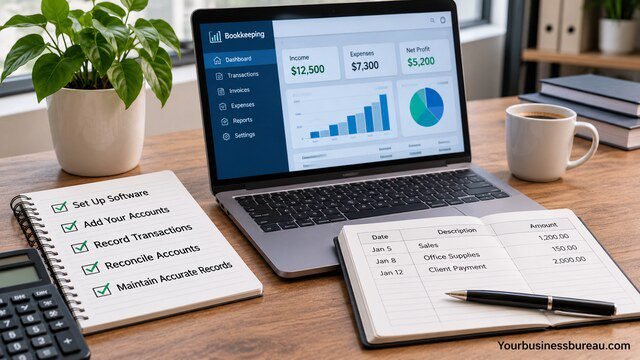
Setting up bookkeeping software correctly is essential because inaccurate opening balances or account categories can affect future reports. Begin by creating your company profile, selecting the appropriate accounting method, and establishing a chart of accounts that reflects how your business operates.
Connect business bank accounts and credit cards using supported integrations, then import historical transactions from a suitable starting date. If you are transferring from another accounting system, verify opening balances, unpaid customer invoices, outstanding vendor bills, and existing liabilities before relying on the new reports.
Once the system is operational, establish a consistent review routine. Automation can save time, but bookkeeping remains an ongoing responsibility. Regular reviews prevent small classification mistakes from accumulating into larger problems.
How Do You Organize Your Chart of Accounts?
A chart of accounts groups transactions into categories such as assets, liabilities, equity, revenue, and expenses. Create accounts that reflect your operations without making the structure unnecessarily complicated. For example, a landscaping company might separately track equipment maintenance, vehicle expenses, supplies, and subcontractor costs. Use consistent categories and consult an accounting professional when deciding how to classify unusual transactions or capital purchases.
What Bookkeeping Tasks Should You Complete Every Month?
Review imported transactions, categorize expenses, reconcile bank and credit card accounts, and check outstanding invoices. Confirm that customer payments are matched correctly and investigate unexpected balances. Review profitability and cash flow trends before closing the month. You should also retain supporting documents and back up or export important financial information according to your recordkeeping policy. A regular monthly routine is usually easier than correcting several months of neglected bookkeeping.
Common Bookkeeping Mistakes, Security Risks, and U.S. Tax Considerations
One of the most common bookkeeping mistakes is mixing personal and business transactions. This makes it harder to understand business performance, identify deductible expenses, and provide organized records to a tax professional. Using separate business financial accounts creates a clearer transaction history.
Another frequent problem is assuming imported transactions are automatically accurate. Bank feeds may contain duplicates, incomplete descriptions, or transactions requiring special accounting treatment. Business owners should also avoid treating every bank deposit as taxable revenue or every withdrawal as a deductible expense. Loans, owner contributions, transfers, and distributions require appropriate classification.
Security and tax compliance deserve equal attention. Financial software contains sensitive customer, banking, and company information. Choose reputable providers, enable available security protections, and ensure that your bookkeeping process supports applicable federal and state recordkeeping requirements.
How Can You Protect Sensitive Financial Information?
Enable multifactor authentication, use unique passwords, and provide employees with only the access they need. Review user permissions when staff responsibilities change or someone leaves the company. Be cautious with third-party integrations because connected applications may receive access to financial data. Regularly review account activity and confirm that your provider offers suitable encryption, recovery options, and data export capabilities.
Can Bookkeeping Software Help With IRS Tax Requirements?
Bookkeeping software can organize income, expenses, invoices, and supporting information needed for federal tax reporting. However, it does not automatically determine whether every expense is deductible or whether your business meets all filing obligations. The IRS generally requires records that clearly show income and expenses, with retention periods depending on the circumstances. Businesses should also verify applicable state sales tax, payroll tax, and reporting obligations with qualified professionals.
FAQ’s
Wave and FreshBooks are accessible choices for beginners because they focus on common tasks such as invoicing and expense tracking. QuickBooks Online may be preferable if you need broader accounting capabilities and professional support. The easiest option ultimately depends on your financial knowledge, transaction volume, and whether you need inventory or payroll integrations.
Yes. Many small business owners manage their own bookkeeping using accounting software, especially when their transactions are straightforward. You should understand basic expense categories, bank reconciliation, and financial reports. However, professional assistance is valuable when dealing with complicated tax situations, inventory accounting, payroll obligations, or significant financial adjustments.
Bookkeeping software can still be useful when you work with an accountant. It helps organize transactions throughout the year, provides access to financial reports, and simplifies information sharing. Your accountant can then focus on reviewing records, preparing taxes, and providing financial guidance rather than reconstructing transactions from bank statements.
Excel can work for very small businesses with limited transactions, but dedicated bookkeeping software generally offers stronger automation, reconciliation, and reporting capabilities. Spreadsheets require more manual work and can be vulnerable to formula errors. As transaction volume increases, specialized software usually becomes a more practical way to maintain consistent financial records.
Some bookkeeping platforms estimate sales tax, organize tax-related expenses, and integrate with tax preparation services. However, these capabilities vary by product and subscription. Software does not guarantee compliance with federal, state, or local tax rules. You remain responsible for accurate reporting and should consult a qualified tax professional when necessary.
Ideally, review transactions weekly and reconcile financial accounts at least monthly. Businesses processing many daily sales may need more frequent attention. Consistent bookkeeping makes it easier to identify errors, track overdue payments, and understand cash flow. Waiting until tax season often creates unnecessary work and increases the risk of missing information.
Conclusion
Choosing the right small business bookkeeping software can simplify financial management, improve reporting accuracy, and help you make better business decisions. QuickBooks Online and Xero offer comprehensive accounting capabilities, while Wave, FreshBooks, and Zoho Books serve different budgets and operational needs.
The best choice is not necessarily the most expensive platform. It is the one that supports your everyday transactions, provides reliable financial information, and remains practical as your company grows.
Start by identifying your essential features, comparing total subscription costs, and testing two suitable platforms with realistic transactions. Once you select a system, maintain a consistent bookkeeping routine to keep your financial records organized and useful.
