









Introduction
Business storage plays a critical role in helping organizations manage inventory, documents, equipment, office furniture, seasonal supplies, digital infrastructure, and operational assets efficiently. Whether you operate a small startup, a retail business, a manufacturing company, or a large enterprise, selecting the right storage solution directly affects productivity, security, operational costs, and business continuity.
Modern business storage extends beyond traditional warehouses. Companies now rely on self-storage facilities, commercial warehouses, cloud storage platforms, document management systems, inventory management software, and climate-controlled storage units to meet diverse operational requirements. The best solution depends on factors such as business size, storage volume, accessibility, compliance requirements, and long-term growth plans.
This comprehensive guide explains how to choose, organize, secure, and optimize business storage while reducing unnecessary expenses and improving operational efficiency.
Assess Your Business Storage Requirements
The first step in selecting business storage is understanding exactly what your company needs to store. Every business has different operational requirements, and choosing storage without evaluating those needs often leads to wasted space and higher expenses.
Begin by identifying every category of items your business stores. This may include inventory, office furniture, electronics, confidential documents, machinery, packaging materials, promotional products, or archived records. Consider how frequently employees need access and whether items require special environmental conditions.
Estimate current storage volume while planning for future growth. Businesses typically expand inventory, equipment, and records over time. Choosing scalable storage prevents costly relocations and operational disruptions later.
Storage Requirement Checklist
| Business Asset | Recommended Storage Type | Access Frequency | Security Level |
| Inventory | Warehouse | Daily | High |
| Office Furniture | Commercial Storage Unit | Occasionally | Medium |
| Documents | Secure Archive Storage | Monthly | Very High |
| Electronics | Climate-Controlled Storage | As Needed | High |
| Equipment | Industrial Storage | Weekly | High |
| Marketing Materials | Self Storage Unit | Seasonal | Medium |
Select the Most Suitable Business Storage Solution
After identifying your requirements, compare the available storage options based on accessibility, security, and cost. The right choice depends on your operations rather than simply selecting the largest available space.
Self-storage units are popular among small businesses because they offer flexibility, affordable pricing, and month-to-month leases. Commercial warehouses better support larger inventory volumes, fulfillment operations, and logistics.
Cloud storage complements physical storage by protecting business documents, financial records, contracts, customer information, and collaborative files. Many organizations combine physical and digital storage for maximum efficiency.
Common Business Storage Options
| Storage Solution | Best For | Advantages | Limitations |
| Self Storage | Small Businesses | Affordable and Flexible | Limited Workspace |
| Commercial Warehouse | Large Inventory | High Capacity | Higher Cost |
| Climate-Controlled Storage | Electronics and Documents | Environmental Protection | Premium Pricing |
| Mobile Storage Containers | Construction Projects | Convenient Access | Limited Security |
| Cloud Storage | Digital Files | Remote Accessibility | Internet Dependent |
| Document Archive Storage | Legal and Financial Records | Compliance Support | Retrieval Time |
Organize Inventory and Business Assets Efficiently
An organized storage system saves time, reduces labor costs, and improves customer service. Businesses with structured inventory systems experience fewer fulfillment errors and better operational efficiency.
Group similar items together while separating high-value inventory from general supplies. Frequently accessed products should remain near entrances or picking stations to reduce retrieval time. Seasonal products can occupy less accessible areas until demand increases.
Use shelving systems, pallet racks, storage bins, barcode labels, QR codes, and inventory management software to maintain accurate records. Establish consistent naming conventions and storage zones so every employee can locate items quickly.
Regular inventory audits help detect misplaced products, damaged goods, and stock discrepancies before they affect business operations.
Protect Business Assets with Strong Security Measures
Business storage should prioritize asset protection. Lost inventory, damaged equipment, or stolen records can create significant financial losses and legal complications.
Choose facilities that provide surveillance cameras, gated access, electronic entry systems, security personnel, and alarm monitoring. Businesses storing confidential information should also use encrypted digital backups and restricted employee access.
Insurance adds another layer of protection. Review policies carefully to ensure adequate coverage for inventory, equipment, and business interruption caused by disasters or theft.
Fire suppression systems, water damage prevention, pest control, and climate monitoring further improve long-term asset protection.
Maintain Climate-Controlled Storage for Sensitive Items
Many businesses store products that can deteriorate under extreme temperatures or humidity. Climate-controlled environments preserve the quality and lifespan of valuable assets.
Electronics benefit from stable temperatures that reduce moisture damage and corrosion. Pharmaceutical products often require strict environmental controls to maintain effectiveness. Paper records, artwork, photographs, textiles, and wooden furniture also remain in better condition within regulated environments.
Before renting climate-controlled storage, verify temperature ranges, humidity controls, emergency backup systems, and maintenance schedules.
Implement Digital Storage and Cloud Backup Systems
Digital business storage has become essential for organizations handling large amounts of electronic information. Secure cloud platforms allow employees to collaborate from different locations while reducing dependence on physical filing cabinets.
Store contracts, invoices, employee records, financial statements, customer databases, marketing materials, and operational documents in organized digital folders. Establish user permissions so employees only access information relevant to their responsibilities.
Automated backups reduce the risk of permanent data loss caused by hardware failure, ransomware attacks, accidental deletion, or natural disasters. Maintaining multiple backup locations strengthens disaster recovery planning.
Version control also prevents employees from overwriting important files during collaborative projects.
Optimize Warehouse Layout for Better Productivity

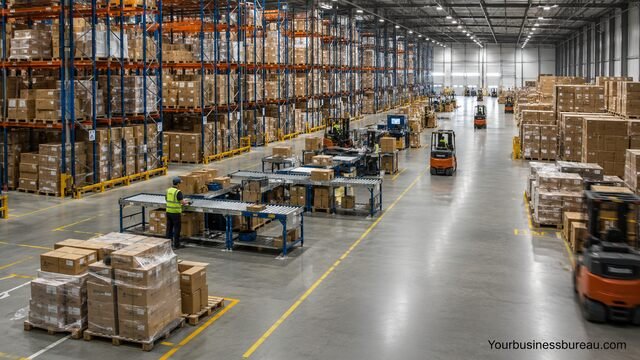
Businesses operating warehouses should continuously improve storage layouts to maximize efficiency and minimize unnecessary movement.
Arrange inventory according to sales frequency, weight, and picking patterns. Fast-moving products belong near shipping areas, while slower inventory can occupy upper shelves or distant storage zones.
Wide aisles improve forklift movement, while clearly marked zones reduce navigation time. Dedicated receiving, inspection, packing, and shipping areas streamline operations and minimize bottlenecks.
Warehouse management software provides real-time inventory visibility, helping businesses reduce stock shortages and excess inventory.
Control Storage Costs Without Sacrificing Efficiency
Storage expenses can increase rapidly if businesses rent more space than necessary or fail to optimize inventory management.
Conduct regular inventory reviews to remove obsolete equipment, discontinued products, and unnecessary records. Selling surplus inventory or recycling unused materials frees valuable storage space.
Compare rental agreements carefully. Flexible contracts may reduce long-term financial commitments while allowing businesses to expand when necessary.
Technology also lowers operating costs by improving inventory accuracy, reducing labor hours, and minimizing stock losses.
Consider outsourcing storage and fulfillment if maintaining an in-house warehouse becomes more expensive than using third-party logistics providers.
Develop Business Continuity and Disaster Recovery Plans
Storage strategies should include preparation for emergencies. Natural disasters, cyberattacks, equipment failures, and power outages can disrupt operations if businesses lack recovery plans.
Create detailed procedures for protecting inventory, recovering digital information, and relocating essential operations when necessary. Store critical documents both physically and digitally to ensure continuous access.
Perform regular backup testing and emergency drills so employees understand recovery procedures before an actual incident occurs.
Maintain updated contact information for insurance providers, emergency services, technology vendors, and facility managers.
Review and Improve Storage Performance Regularly
Business storage requirements evolve as organizations grow. Periodic evaluations ensure storage systems continue supporting operational goals efficiently.
Track key performance indicators such as storage utilization, retrieval speed, inventory accuracy, damage rates, operating costs, and order fulfillment times. Analyze trends to identify opportunities for improvement.
Employee feedback also provides valuable insights into workflow inefficiencies, storage bottlenecks, and organizational challenges.
Schedule quarterly reviews to adjust layouts, update technology, improve security measures, and remove unnecessary inventory.
Continuous improvement helps businesses remain competitive while supporting long-term expansion.
Best Practices for Business Storage Success
Successful businesses treat storage as a strategic investment rather than simply a place to keep assets. Well-designed storage systems improve operational efficiency, customer satisfaction, and profitability.
Maintain accurate inventory records, implement security protocols, organize storage logically, use scalable solutions, and combine physical with digital storage. Regular audits, employee training, and technology adoption further strengthen storage performance.
Planning for future growth ensures storage infrastructure remains effective as inventory volumes, workforce size, and customer demand increase.
Common Mistakes to Avoid
Many businesses experience unnecessary costs because of preventable storage mistakes. Recognizing these issues early helps maintain efficient operations.
Avoid these common errors:
- Renting more space than necessary.
- Ignoring future business growth.
- Failing to label inventory consistently.
- Neglecting regular inventory audits.
- Overlooking climate requirements.
- Using weak security measures.
- Storing confidential documents without encryption.
- Skipping insurance coverage.
- Allowing obsolete inventory to accumulate.
- Operating without disaster recovery planning.
Conclusion
Business storage is much more than finding additional space. It is an essential component of inventory management, operational efficiency, security, compliance, and long-term business growth. Organizations that carefully evaluate their storage needs, implement organized systems, protect valuable assets, and adopt modern digital technologies gain significant competitive advantages.
Whether your business relies on self-storage, commercial warehouses, climate-controlled facilities, cloud storage, or a combination of these options, choosing scalable and secure solutions supports smoother operations while reducing costs. Regular reviews, inventory optimization, and proactive planning ensure your storage strategy continues meeting business demands as your organization evolves.
FAQ’s
Small businesses often benefit from self-storage units for physical assets and cloud storage for digital files because both offer flexibility, affordability, and scalability.
Choose enough space for your current inventory while allowing room for projected growth over the next 12 to 24 months. Avoid paying for excessive unused space.
Climate-controlled storage is recommended for electronics, documents, artwork, pharmaceuticals, wooden furniture, and other temperature-sensitive items.
Use shelving systems, barcode labeling, inventory management software, regular audits, and designated storage zones to maintain accurate and efficient organization.
Install surveillance systems, restrict access, maintain insurance coverage, perform routine inspections, implement cybersecurity measures for digital data, and use climate controls where appropriate.
Yes. A hybrid approach provides secure physical storage for inventory and equipment while offering remote access, collaboration, backup, and disaster recovery for digital information.


